Lab 1c
Advanced WebGL - 3D Robotic Arm
Due: Sunday, May 24th 2020, 23:55
- Individual Effort:
- No team participation is really encouraged in the case of the homeworks or the labs.
You're are not allowed to use any libraries or extra code except gl-matrix, webgl-utils.js and some helper functions in order to initialize WebGL / load shaders. Especially Three.js is not allowed! If you're not sure or want to use some library, ask the teaching assistants before.
Objectives:
While Lab 1 a and b were rather mechanic, with the aim to help you understand the issues of transformations and their realization in WebGL, the goal of this lab is to be a bit more creative as well as further improve your understanding of transformations You will do so by building and animating a robotic arm.Requirements:
We have set a few basic requirements for this assignment:- Your robotic arm must be composed of at least 6 shapes (they do not have to be unique). These shapes can include basic primitives (like spheres, cylinders, etc). More complex shapes could also be modeled in a modeling program, such as the open source Blender, and loaded into our program.
- Your robotic arm must contain at least four levels of hierarchy.
- The robotc arm must have at least one base plate (can be ground), one joint, two fingers and three rotational components.
- The robotic arm should be able to pick up an object (collision detection), move it around and then let go of it again.
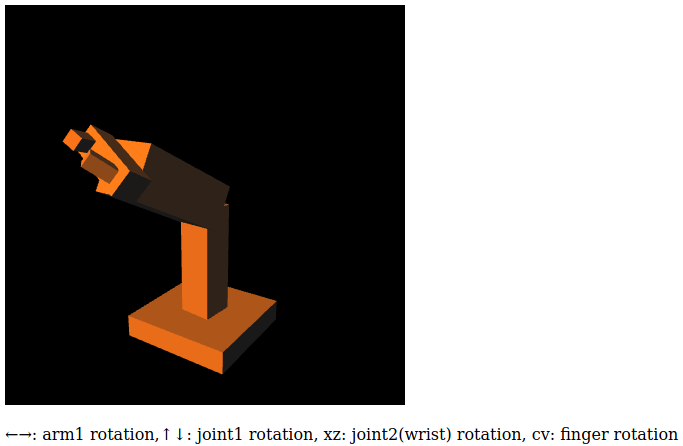
- Please take and attach a screenshot of your sculpture. Identify your sculpture's first four levels of hierarchy.
- The robotic arm of the space shuttle or those found in industrial applications.
- There are also plenty of videos of less serious examples on YouTube, like this or this.
Grading:
- (5%) You have a program that can read in a geometry file and displays it.
- (10%) Include the Phong illumination model.
- (25%) Your program creates a robotic arm, that meets most requirements.
- (40%) Your program creates a robotic arm, that meets all requirements, but no animation.
- (70%) Your program creates a robotic arm, that meets all requirements, including animation.
- (100%) Your program creates a robotic arm, that meets all requirements, including animation and a gravitational force that lets the picked up object fall back to the ground or base plate if the arm lets go of it.
- (110%) Your program creates a robotic arm, that meets all requirements, including animation, gravitational force that lets the object fall back to the ground or base plate if the arm lets go of it and the arms and objetcs shadows are projected on the ground or base plate.
Hints
While this lab is intentionally free-form, you might find some of these hints helpful. However, there are many roads that lead to Rome, as they say!- It is important, that you are trying to break down the lab into smaller goals, that you have an idea about on how to achieve. It's perhaps worthwhile to have a simple parser that reads in a scene description. Alternatively, you could create a gui for controlling the light source and camera.
- You should think on how to read in the geometry. A parser for this will be unavoidable. It might be good to lean on the OBJ file format. It is a very common format. Many modeling packackes can read and write OBJ files. Plus, they are rather simple to understand. You could then start with these sample Models.
- Lastly, you need to specify your scene graph. It is a very simple one. Basically you need to be able to read in a tree structure. Perhaps the simplest way is to provide a list of (parent, child) pairs and their point of attachment. Besides just having a static tree, you might also want to specify how parent/child is interacting (rotation, translation, scaling?) and how "fast" this motion should be. There really is no standard for this notation.
- If you'd like to take a screen shot, you could do this by reading out the OpenGL
framebuffer. For simple image formats consult the
Portable Pixmap format. - Example:
Submission
- via gitlab.
Grading Criteria
Grading the labs will be based on the following:- 80%: Correctness and adherence to assignment specification.
- 10%: Readability and structure of code, use of comments, indentation, etc.
- 5%: Efficiency and speed (only an issue if its very inefficient)
- 5%: Adherence to lab procedures (submitting, naming conventions, etc)
In order to get a full mark, you need to do all of the assigned tasks AND adhere to to lab procedures while creating readable and efficient code. I.e. if you accomplish only 70% of the tasks correctly, but you do not adhere to lab procedures, your final mark will be 70*(1-0.05) = 66.5%.
Last modified: April 22, 2018 Lorenz Kummer / lorenz DOT kummer AT univie DOT ac DOT at
Kevin Sidak / kevin DOT sidak AT univie DOT ac DOT at